How Wakeshift works
Three parties are involved: your app, Wakeshift and the agent. Your app offers events and emits them when something happens. Wakeshift holds the subscriptions and wakes each subscribed conversation. The agent subscribes when its user asks it to watch something, and acts when it wakes.
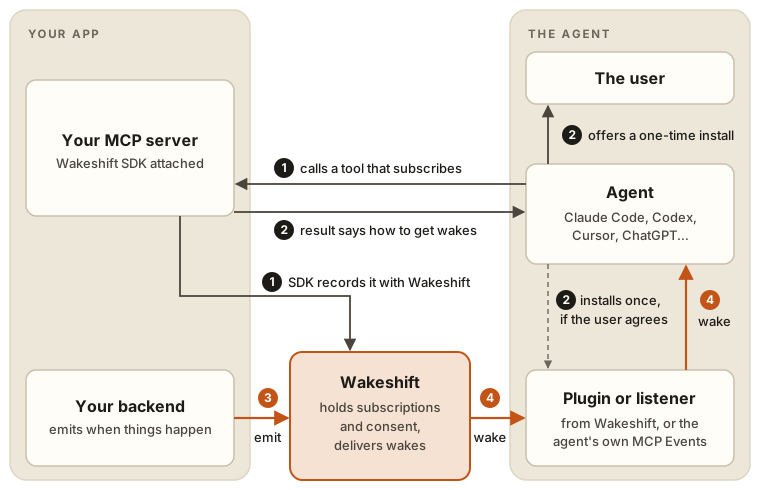
The flow
- The agent subscribes. Its user asks it to watch something, such as CI on
acme/api, and it calls one of your tools that subscribes (a tool you declare withsubscribes), or thesubscribe_eventstool the SDK adds. Your tool callssubscribe, and the SDK records the subscription with Wakeshift, for that conversation. Your server talks to Wakeshift here, and again when you emit. - The result tells the agent how to receive wakes. The SDK adds it to your tool's result; you write nothing for it. Some agents need Wakeshift's plugin, installed once: the agent offers the install to its user and runs it only if they agree, and it doesn't ask again. Agents with MCP Events built in, and those that start a background listener, need nothing installed.
- Something happens in your app, and you emit. Your backend calls
emiton the event, from a webhook handler, a job or anywhere else. - Wakeshift wakes the subscribed conversation, through Wakeshift's plugin, a background listener or the agent's own MCP Events support. Every conversation subscribed to that occurrence wakes with your event's text and payload, marked as coming from your app, not as an instruction from the user. The agent then acts on what arrived: it looks into it, uses your tools or tells the user.
What reaches your server
Your MCP server sees only the tool calls agents make, and Wakeshift hears from your app only when you subscribe a conversation or emit. Wakes don't pass through your server: they go from Wakeshift to the agent directly, through Wakeshift's plugin, a background listener or the agent's own MCP Events support. You run no queue, keep no connection open to any agent and write no code for any particular agent.
Wakeshift holds what's needed to deliver safely:
- Subscriptions. Each one belongs to the conversation that made it (for clients that speak MCP Events, to your signed-in user), and lasts until it's ended or expires (when a subscription ends).
- Consent. A subscription starts only because the user asked their agent for it, and only if your tool or your event's
authorizeallows it. A one-time install runs only if the user agrees. - Delivery. Wakeshift paces wakes and holds occurrences for a conversation that isn't connected.
How each agent receives wakes
| How | Agents | What the user does |
|---|---|---|
| MCP Events, built into the client | ChatGPT, OpenClaw automations, Hermes Agent, Mastra and others | Asks the agent to watch something; nothing to install |
| Wakeshift's plugin, installed once | Codex, opencode, OpenClaw, Hermes Agent, and Claude Code if the user wants it | Agrees once to the install the agent offers |
| A background listener the agent starts | Claude Code, Cursor, GitHub Copilot CLI, Antigravity CLI and agents Wakeshift doesn't know | Nothing to install; approves a background command, if the agent asks |
| With its next call | Cursor cloud agents, Goose, Cline | Nothing: occurrences arrive with the agent's next call to your tools |
Your code is the same for all of them. Agents has the details for each agent: how fast it wakes, what the user approves, and what the install changes.
Next steps
- Quickstart: offer an event from your MCP server and wake Claude Code with it.
- Events: define events, subscribe from your own tools and emit to one conversation or many.
- Long-running jobs: the same flow for a job that outlives the tool call that started it.